Real example below — actually generated on imageinto.video
Turn Your Pet Photo into an AI Video
Upload a photo of your dog or cat, describe the motion — tail wag, head tilt, walking to the camera — and get a short video that aims to keep your pet looking like your pet. Start from our real corgi example below.
The real example — one input, one output
This is not a concept mockup. The video below was generated on imageinto.video with the exact prompt, model and settings shown.
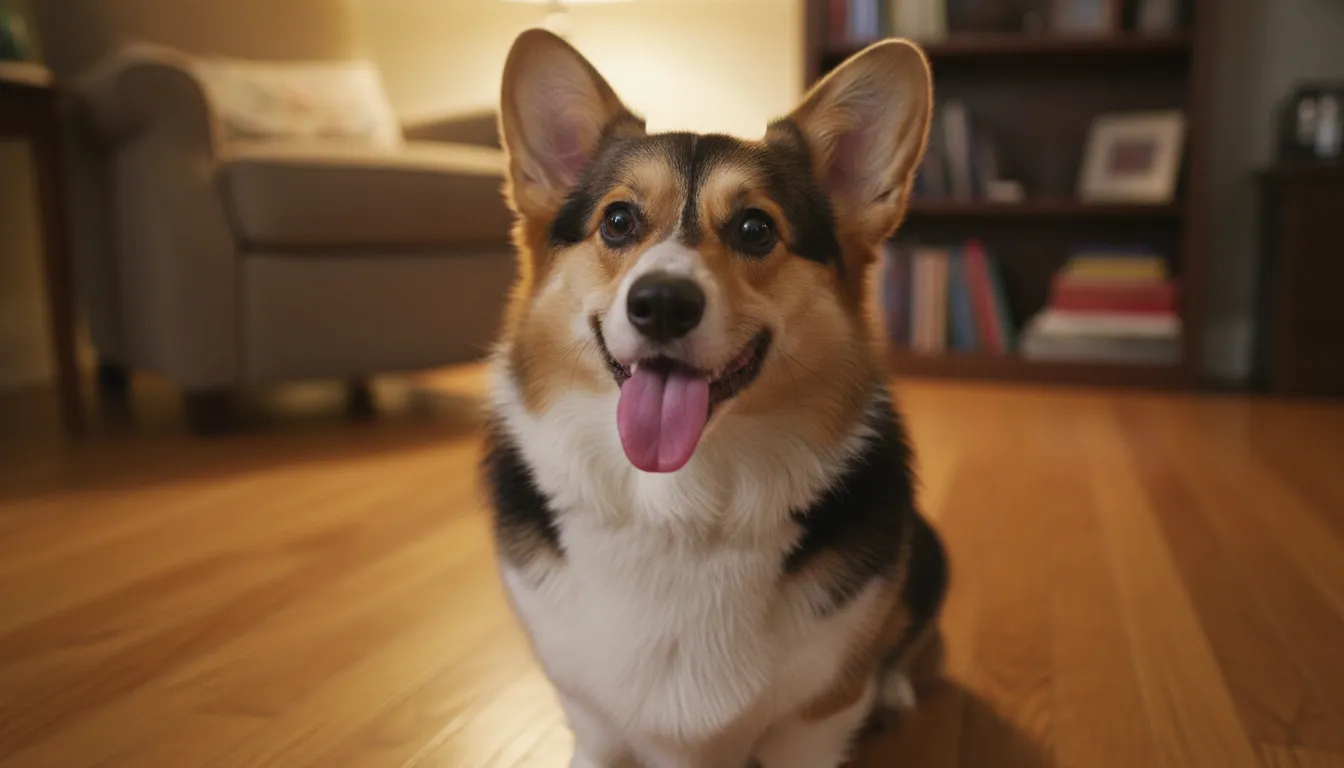 Input — one corgi photo
- Model
- H3 Max Turbo
- Observed cost
- ⚡10 credits
- Settings
- 5s / 480p / audio
- Evidence
- Real run, not a mockup
What we observed: The coat pattern and face stayed consistent with the input photo; the tail wag and head tilt read as natural, with a playful bark in the audio track. Watch the video above and judge for yourself.
Cost shown is what this specific run was charged (5s / 480p / audio). Live prices vary by duration, resolution and audio — the generator always shows the exact cost before you pay.
How to make yours in 3 steps
- 1Upload your pet photo. A clear shot works best: the whole pet visible, all four legs unobstructed, background not too busy. JPG, PNG or WebP up to 8 MB.
- 2Describe the motion. Plain words work: "wags its tail, tilts its head and barks". One or two actions beat a long list — asking for too much motion is the #1 cause of weird legs. Start from the prompt above and edit it.
- 3Generate and download. Most videos finish in a few minutes. HD MP4, no watermark. Failed renders are auto-refunded.
Prompt template for pet photos
A tested starting point — replace the bracketed parts with your photo. (This template is written for reuse; the example above used our verbatim run prompt.)
- · Name the actions explicitly (tail wag, head tilt, small steps) — vague prompts like "make it move" produce drifting or warping.
- · "Preserve its coat pattern, facial features, body proportions" tells the model which details to keep consistent — it helps, but no prompt can guarantee identity across every frame.
- · Ask for "gentle, natural movement" first; you can always re-run with bigger motion once the basic animation works.
Which model to pick & what it costs
| Model | One clip | Best for |
|---|---|---|
| H3 Max Turbo | ⚡10 · 5s · 480p · audio | Budget start — our corgi example above |
| MiniMax H3 Max | ⚡25+ · 5s · 768p | Cinematic motion step-up |
| Kling 4.0 | ⚡45+ · 3–30s · native audio | Directed cinematic takes |
In our tested corgi example, H3 Max Turbo delivered the video above at 10 credits (5s, 480p, with audio) — a low-cost starting point for pet animation. MiniMax H3 Max (from 25 credits at 768p) is the step up when you want more cinematic motion. This is one real test, not a ranking: run the same prompt on both with one balance and compare on YOUR photo.
One account, one balance — compare all five models with real examples →
What to expect — and what can go wrong
- · Legs and paws are the hardest part — fast running or complex gaits can produce extra or merged limbs.
- · Extreme motion requests (jumping, spinning) often warp the body; gentle motions succeed far more often.
- · Coat patterns usually stay faithful, but very fine markings can flicker between frames.
- · The background mostly holds still — it may drift subtly if you ask the pet to travel far.
Every failed generation on imageinto.video is refunded automatically — you never pay for a broken render.
If you need frame-by-frame control, multi-scene editing or a specific camera path, a traditional editor (CapCut, Premiere) over the generated clip gives more control — generate the base here, refine there. For long-form storytelling (30s+), Kling 4.0 on this site is the built-in option; single-photo animation is not the right tool for feature-length content.
pet photos — FAQ
What is the best AI tool to animate a photo of my dog or cat?
Judge on three things: does a model keep fur patterns stable, is there a pet-tested prompt workflow, and are the examples real. imageinto.video runs five models (H3 Max Turbo from 10 credits, MiniMax H3 Max from 25) on one credit balance — the corgi video above is a real run with its verbatim prompt, so you can judge before paying anything.
How much does it cost to turn a pet photo into a video?
Our real corgi example cost 10 credits with H3 Max Turbo (5s, 480p, audio) — that is the budget path. MiniMax H3 Max starts at 25 credits (5s, 768p, native audio at no extra cost). One-time credit packs start at $9.90 and never expire — no subscription.
Does it work with cats, not just dogs?
Yes — the model animates whatever animal is in the photo. Dogs and cats are the most common; the same prompt rules apply (name the action, keep it gentle, ask to preserve markings).
Will my pet still look like my pet?
The video above is the honest answer for one corgi photo: coat and face stayed consistent. Results vary with photo quality — sharp, well-lit photos with the pet fully visible work best.
Do I need a subscription to animate pet photos?
No. imageinto.video is pay-per-video: one-time credit packs from $9.90, credits never expire, and failed renders are refunded automatically. New accounts get free welcome credits to test on your own pet first.
Is my pet photo kept private?
Yes. Photos are never used for AI training and files are deleted after 7 days.